芯位管理平台重构记录
2025-5-14
芯位管理平台这个项目对公司很重要,但是太老了而且很大。开发的时候修改一下要重新构建很久,而且很多组件没有封装,非常不好用。
最近其他项目没那么忙,组内安排了重构的工作。记录一下我负责的这部分。
重构项目使用模版:https://github.com/HalseySpicy/Geeker-Admin
关于 ProTable 组件的搜索联动问题
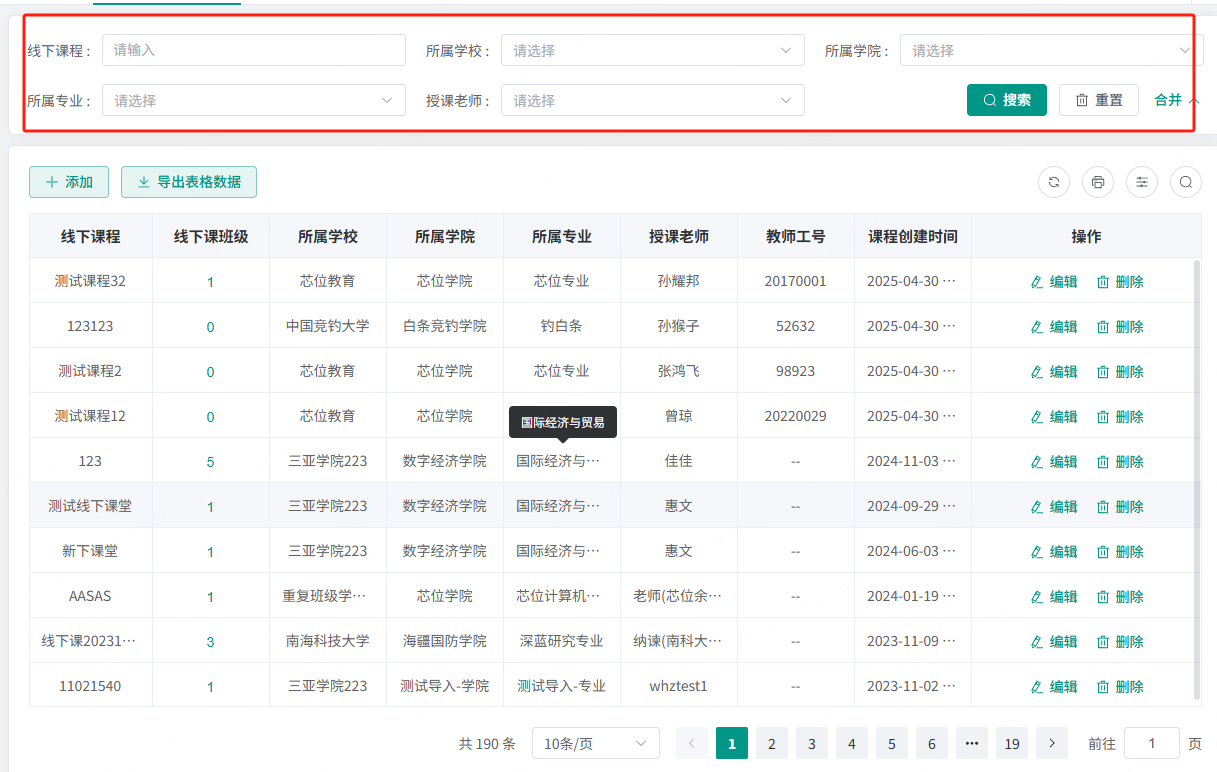 如图这个表格,搜索项互相联动,选择学校后,学院,专业,授课老师的选项都要变为该学校下的选项。同时清空已选的值。
解决思路是修改 ProTable 组件,监听搜索项的 change 事件,和 reset 事件,重新获取枚举数据。
解决办法:在 search 中添加 change 事件,只举个选择学校的例子: 先贴相关代码:
// 选择学校后触发的回调函数
const schoolChange = (val: any) => {
  schoolId.value = val;
  // 清空学院搜索框
  proTable.value.searchParam = {
    ...proTable.value.searchParam,
    college: "",
    major: "",
    teacherName: "",
  };
  // 重新获取学院,专业,老师枚举数据(即备选项)
  getCollegeList();
  getMajorList();
  getTeacherList();
};

  // 表格配置项
  const columns: ColumnProps<any>[] = [
    ...
     {
      prop: "school",
      label: "所属学校",
      isFilterEnum: false,
      enum: getSchoolData,
      fieldNames: {
        label: "name",
        value: "id",
      },
      search: {
        el: "select",
        // 添加change配置
        change: schoolChange,
      },
    },
    ...
  ]
可以看到,是在 columns 配置项中添加了 change 事件。当然,要同步修改组件代码。
如果只监听 change 事件,当点击重置按钮后,如 College 选项应该恢复成全部学院,但是由于没有做相应处理,选项还是上次经过筛选后的结果。所以也要监听 reset 事件:
  <ProTable ref="proTable" :columns="columns" :request-api="getTableList" :on-reset="handleReset">
    ...

    </ProTable>
在 handleReset 函数中重新请求枚举数据
组件代码的修改方法我向模板作者提了 PR:https://github.com/HalseySpicy/Geeker-Admin/pull/549
具体的组件更改可以在 PR 中查看
useTable 中的数据使用问题
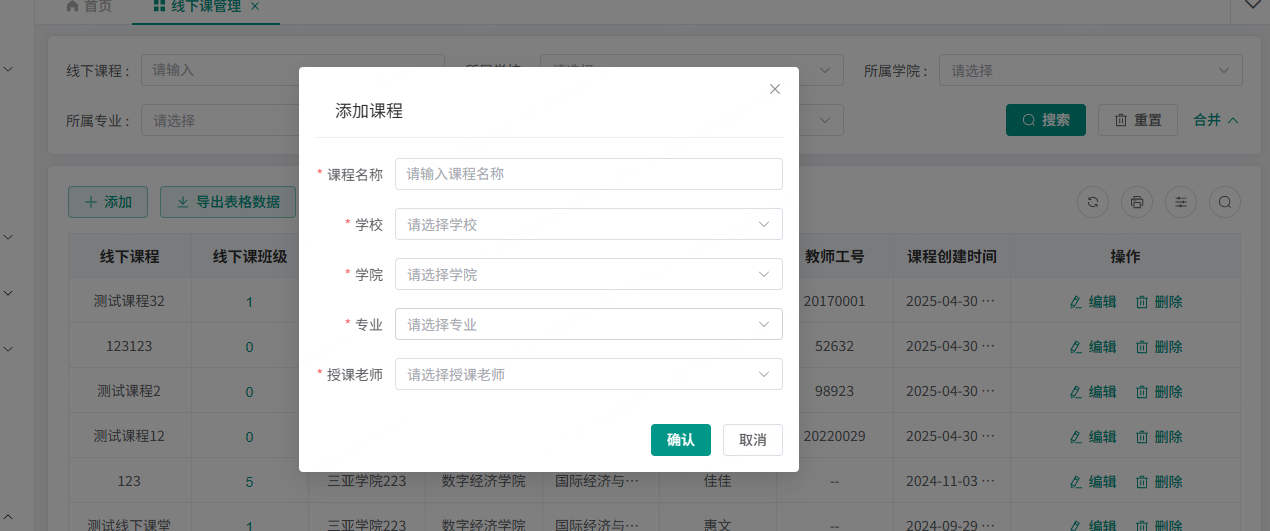 可以看到,表格搜索和新增表单都使用到了同一个逻辑,即 select 联动。
同时,useTable 钩子中,使用闭包记录了已选择的学校 ID,学院 ID 等数据。如果一次导出,两边使用,搜索和表单会互相干扰数据。所以应该运行两次 useTable 函数,导出两批互不干涉的数据:
// 表格数据
const { proTable, columns, getTableList, handleReset } = useTable();

// 表单数据
const {
  getCollegeList,
  getMajorList,
  getTeacherList,
  schoolId,
  collegeId,
  majorId,
  collegeList,
  majorList,
  teacherList,
  dealParams,
  handleReset: handleReset2,
} = useTable();
这其实是一个闭包使用的问题。闭包会记录状态,所以如果有两个地方需要使用,就要运行两次返回两份数据。
拖拽问题
Vue 前端拖拽有成熟的依赖可以用。
比较老的 SortableJS,但是太久不更新了,已经跟不上 Vue 的版本。
比较新的 vuedraggableplus,是基于 SortableJS 封装,项目中用了这个。
具体的使用也不算难,可以参考官网文档。当然文档一如既往的屎
一般拖动都有动画,这里需求是不要动画移动效果,只交换位置。
方法是定义两个变量,记录拖动前后的位置。
拖动时,在onMove事件中,记录拖动前后的位置,并 return false 阻止动画。
const startIndex = ref(-1);
const endIndex = ref(-1);

const onChoose = e => {
  startIndex.value = e.oldIndex;
  console.log(startIndex.value);
};
const onMove = e => {
  endIndex.value = Number(e.related.dataset.id);
  console.log(endIndex.value);
  return false;
};
const onEnd = (evt: any, type) => {
  const { oldIndex } = evt;
  //arr是业务相关
  const arr = type == 0 ? geelyImageUploadList.value : type == 2 ? beelineUploadList.value : xinweiServiceList.value;
  const newId = endIndex.value;
  if (arr[oldIndex].id == evt.originalEvent.target.dataset.id || evt.originalEvent.target.dataset.id === undefined) {
    return;
  }
  handleDragSortById(arr, oldIndex, newId, type);
};
// const { start: geelyListStart } =
useDraggable(geelyList, geelyImageUploadList, {
  filter: "#geelyUpload",
  swap: true,
  swapClass: "image-icon-items",
  onChoose: onChoose,
  onMove: onMove,
  onEnd: evt => {
    onEnd(evt, 0);
  },
});

// 拖动结束后
const handleDragSortById = (originList, oldIndex, newId, listTypeKey) => {
  // 判断非法位置
  if (newId === undefined || newId === null || Number(newId) === -1) return;
  // 拖拽未完成
  if (!allowUserDragSort.value) return;
  // 相同位置
  if (Number(originList[oldIndex].id) === Number(newId)) return;

// 发送请求,交换位置
  const params = {
    firstId: originList[oldIndex].id,
    secondId: newId,
  };
  allowUserDragSort.value = false;
  changePosition(params)
    .then(async () => {
      await initConfigList(listTypeKey);
    })
    .finally(() => {
      allowUserDragSort.value = true;
      startIndex.value = -1;
      endIndex.value = -1;
    });
};